Dangerous files get .quarantined appended and their
execute bit stripped. Nothing vanishes behind your back — you can still
look at what someone tried to hand you.
A command line tool · MIT · macOS and Linux
Your agent can read the internet. It still can't see it.
Every research tool an agent has returns text. Ask it what a product looks like and it gets a wall of prose about a thing it has never laid eyes on. Agent Eyes returns pictures it can open, the design system read out of the live page, and every asset checked before it is handed over.
agent-eyes see https://astro.build 8 colours, in use order 190 declared tokens read from the live CSSOM, not sampled from the picture
One command
A directory the agent can actually read
Everything on this page is real output. The screenshots, the colour
values, the counts — all of it came out of a single run against
astro.build, unedited except for a crop and a rescale.
$ agent-eyes see https://astro.build --intent design

  👁  Astro
     https://astro.build

  saw it via   stealth — Headless stealth browser with a real fingerprint
  wrote        ~/.agent-eyes/captures/astro.build

  screens      8
  components   23
  assets       36 images · 42 icons · 5 logos · 3 fonts
  checked      86 files · ✓ all clean

  colors       #bfc1c9 #f2f6fa #eef0f9 #ffffff #858b98@0.20 #54b9ff #0c0f19 #4bf3c8
  fonts        ui-sans-serif, ui-monospace, Obviously
  spacing      2px 4px 8px 10px 12px 16px 20px 21.5px
  tokens       190 CSS custom properties

  look at these to actually see it:
    …/screens/desktop-full-readable-01.jpg
    …/screens/desktop-full-readable-02.jpg
    …/screens/mobile-full-readable-01.jpg
    …/screens/mobile-full-readable-02.jpg
    …/screens/mobile-full-readable-03.jpg
    …/screens/mobile-full-readable-04.jpg
The last block is the part that matters. A manifest that only
lists JSON teaches an agent to reason about a design it never looked
at — so manifest.json opens with a
read_this_first block naming the images, and says in plain
words that they are images and should be opened.

Full pages, cut down to a size a model can take in
A full-page shot of a marketing site is routinely 5228 × 17682. No
model takes that in. Agent Eyes writes the original and, beside it,
downscaled slices named -readable-01.jpg,
-02, and so on — the same page, in pieces that survive
being looked at.
Both themes, both widths
Desktop and mobile, light and dark, in one pass. When a site ignores the dark preference you get identical files rather than an invented difference — the shots are what the browser rendered, nothing more.

The interface, taken apart
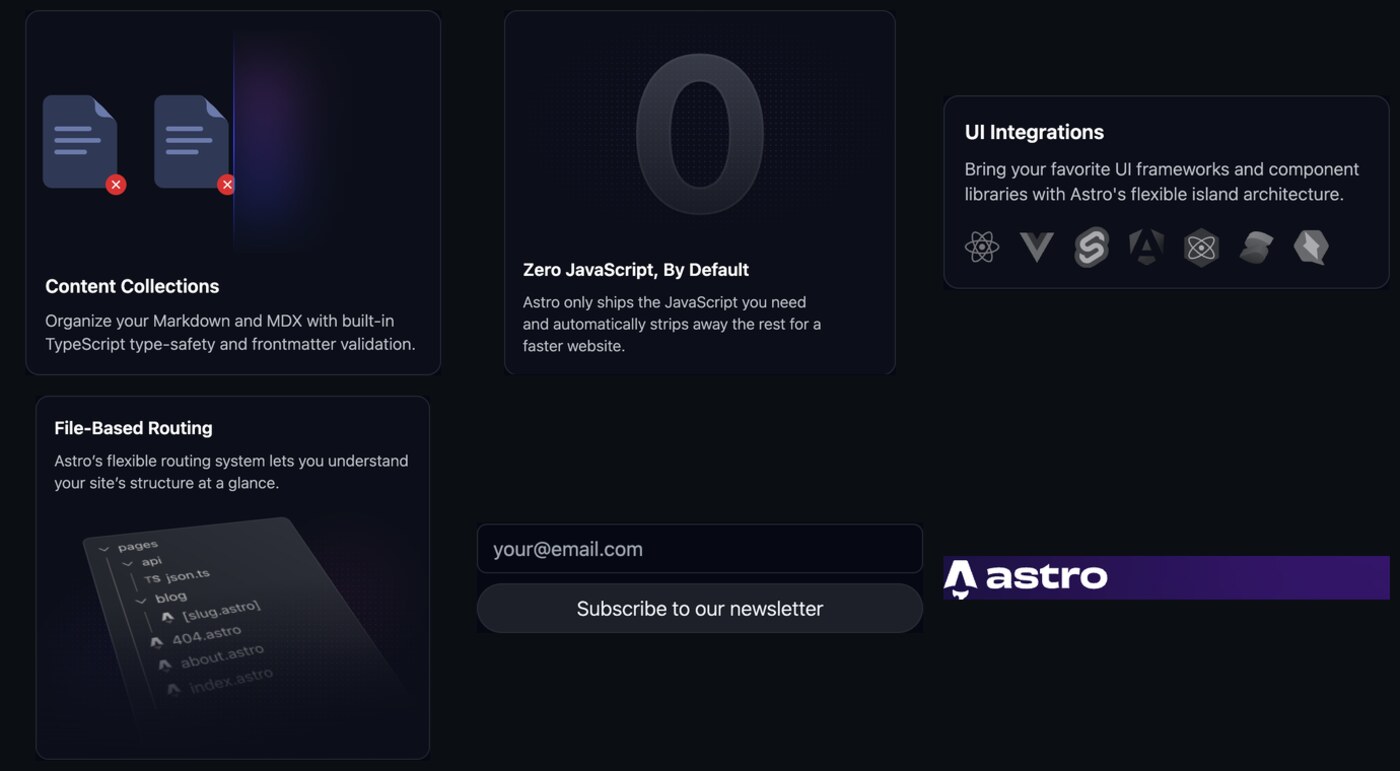
Navigation, heroes, buttons, cards, inputs and forms are cropped out as their own PNGs, so an agent asked to rebuild one component looks at that component instead of hunting for it inside a seventeen-thousand-pixel screenshot.
design.json
Read from the page, not guessed from a picture
Colour picked off a screenshot is a colour after JPEG, after blending, after the browser's own gamma. Agent Eyes reads the computed styles of the rendered document instead, so every value below is the value the page actually declares — with how many elements use it, and a real selector to go and look at.
Eight of the colours in design.json — each with its value, how many elements use it, the roles it plays, and a selector to go and look at. The full file also splits them into background, text and border sets.
Type sizes12px · 13.5px · 14px · 16px · 18px · 24px6
Weights300 · 400 · 600 · 7004
Spacing2 · 4 · 8 · 10 · 12 · 16 · 20 · 21.5 · 24 · 32 · 80px11
Radii7.5px · 8px · 12px · 16px · 20px · 24px · 9999px8
Font facesObviously (100–1000) · Inter (300–600) · MDIO (400), plus fallbacks6
Breakpoints640 · 768 · 1024 · 1280 · 1536px, and prefers-reduced-motion10
Gradientslinear-gradient(83.21deg, rgb(50, 69, 255) 0%, rgb(184, 69, 237) 100%) …12
Custom props190 declared CSS custom properties, resolved190
One run. The self-hosted faces come back with their real
@font-face descriptors and source URLs — including the ones a
browser refuses to expose to page script because the stylesheet is
cross-origin.
get · scan
Downloading is the easy half. Knowing what arrived is not.
An agent that can fetch files is an agent that can be handed something. Every file Agent Eyes downloads — including the 86 assets in that astro.build run — is inspected before it is handed back, and the result is printed out loud, because silence reads as skipped.
$ agent-eyes get https://astro.build/favicon.svg \
                  https://raw.githubusercontent.com/python/cpython/main/README.rst --out ./dl

  ⬇  2 of 2 file(s)  →  dl

    ✓ favicon.svg                              image/svg+xml                 1K
    ✓ README.rst                               text/plain                    9K

  ✓ checked — every file is what it claims to be. Nothing executable.
    (no virus scanner installed; `brew install clamav` adds one)
And when something is wrong, it says so in the same shape. Below is a
real scan of two files planted on disk: a shell script named
.png, and an SVG carrying a <script> tag
that would run the moment anything opened it in a browser.
$ agent-eyes scan ./risky

  ⬇  2 of 2 file(s)  →  risky

    ✗ brand-kit.png.quarantined                text/x-script                18B
        · claims to be .png but the bytes are an executable (text/x-script)
        · this file is executable code
        · quarantined — renamed .quarantined, cannot execute
    ✗ logo.svg.quarantined                     image/svg+xml               115B
        · SVG carries script, event handlers, or an external entity
        · quarantined — renamed .quarantined, cannot execute

  ✗ checked — something dangerous was found and made inert. Read the notes above.
What the file really is, versus what the extension claimed. That mismatch is the whole trick, and it is the first thing checked.
Zips with entries pointing outside the folder you unpack them into are caught before extraction, not after.
screen · record · describe
Not just the web — the screen in front of you
A headless browser cannot reach a native app, a logged-in desktop session, or the thing you are pointing at right now. So Agent Eyes also captures the display, and can lay a labelled coordinate grid over any image so an agent has something to aim at.
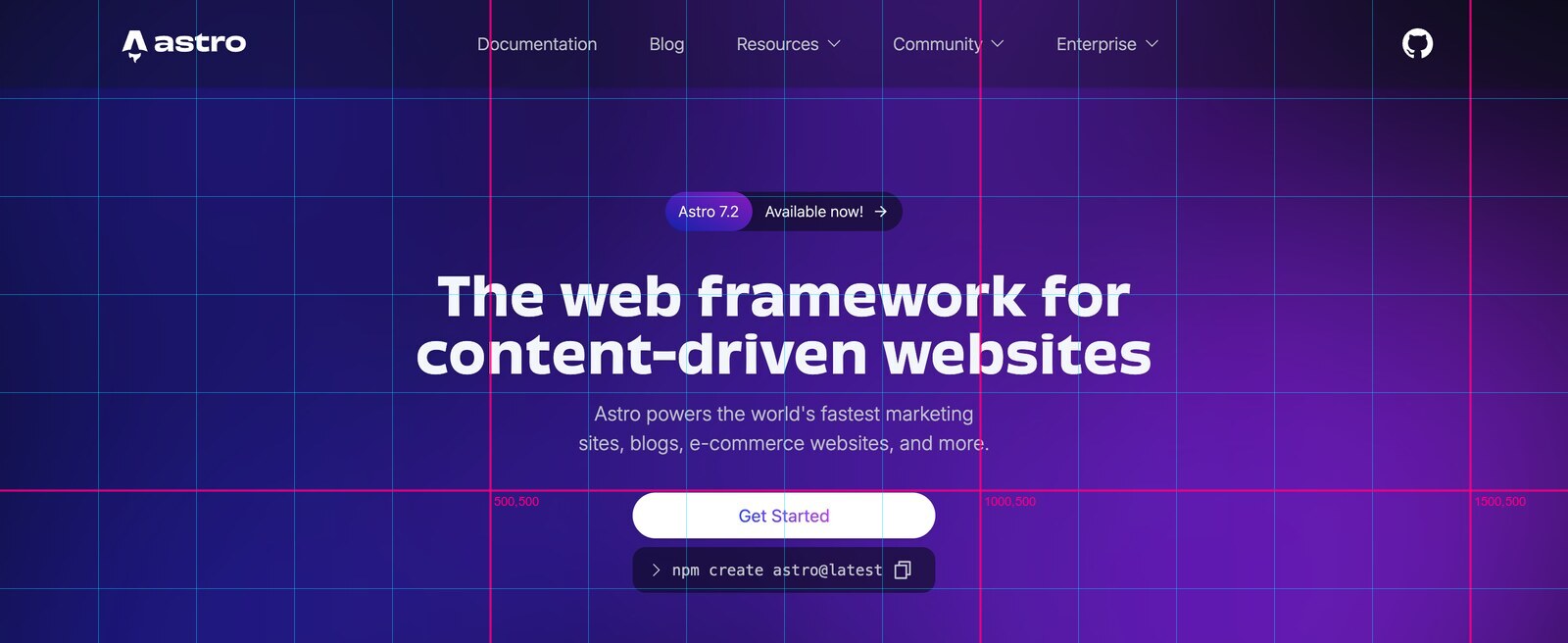
$ agent-eyes screen --grid              # a shot, plus a coordinate copy
$ agent-eyes screen --window            # click the window you mean
$ agent-eyes screen --region 0,0,1440,900

$ agent-eyes record --seconds 8         # film it, then cut it into stills
$ agent-eyes frames demo.mp4 --count 6

$ agent-eyes describe shots/*.png       # a local model looks, so Claude doesn't
Why describe existsReading thirty screenshots
costs thirty screenshots' worth of context. describe hands
them to a vision model running on your own machine and returns
sentences — free, and small enough that an agent can look at a whole
recording instead of one frame per turn.
One permission, and only oneScreen Recording. Agent Eyes cannot send input — no clicks, no keystrokes — so it has no use for Accessibility and never asks for it.
agent-eyes setup does not tell you to go find System
Settings. It opens the pane, names the single row to switch on, and then
proves the permission works by taking a real screenshot with it.
It doesn't say no
When a page fights back, it climbs
A tool that returns "blocked" has handed the problem back with nothing attached. Agent Eyes works down an ordered list instead, cheapest and most autonomous first, and verifies every rung against the extraction rather than the status code — a challenge page returns HTTP 200 all day long.
stealthHeadless stealth browser with a real fingerprint
stealth+cloudflareStealth browser, waiting out interstitial challenges
real-chromeYour actual Chrome build rather than bundled Chromium
agent-profilePersistent Agent Eyes profile — reuses logins you granted before
attachAttach to the browser you already have open (
--cdp)hybridVisible window — you clear the gate, Agent Eyes captures the rest
A rung counts as failed if the extraction looks wrong: a known block marker in the title or body, fewer than twelve visible elements, or no colours resolved at all. Only when all of them are exhausted does it stop — and even then it is a handoff, not a failure.
$ agent-eyes see https://app.example.com/pricing

  Not blocked — just needs you for one step.

  Why: block marker: 'just a moment'
  Do:  No path reached the real page. Two things that work: run
       `agent-eyes see https://app.example.com/pricing --hybrid` to clear it by
       hand once, or, if it is already open on screen, `agent-eyes screen
       --window` to capture it from your display instead.

  Tried:
    · stealth              block marker: 'just a moment'
    · stealth+cloudflare   block marker: 'just a moment'
    · real-chrome          page nearly empty (3 visible elements)
    · agent-profile        page nearly empty (3 visible elements)

$ echo $?
75
Seventy-five is the convention: not a crash, not a refusal — a specific, small thing only a person can do. Clear it once by hand and the session is saved into the profile, so the next run climbs no further than the first rung.
The whole surface
Twelve commands
| Command | What it does |
|---|---|
| agent-eyes see URL | Look at a web page: screenshots, design tokens, assets, UI anatomy. |
| agent-eyes screen | Capture the screen — a display, a region, or a window you pick. |
| agent-eyes grid IMAGE | Overlay a coordinate grid on an image so an agent can aim clicks. |
| agent-eyes record | Film the screen, then break it into frames you can actually read. |
| agent-eyes frames VIDEO | Pull stills out of any video — a recording, or something you downloaded. |
| agent-eyes describe IMAGES | Have a local model look at images so Claude does not have to. |
| agent-eyes get URLS | Download files, then check what actually arrived. |
| agent-eyes scan PATH | Check files already on disk — one file or a whole directory. |
| agent-eyes doctor | What can this machine actually see and do, right now. |
| agent-eyes setup | Grant the permissions Agent Eyes needs — one pane at a time, verified. |
| agent-eyes models | See which local models are available, and pick one. |
| agent-eyes install-browsers | Download the browser engines Agent Eyes drives. |
see takes an --intent —
quick, clone, brand,
design, responsive or full — which
picks the capture recipe rather than making you name breakpoints and
themes. Every command takes --json.
$ agent-eyes doctor

  web vision     ✓ chromium launches
  screen vision  ✓ screencapture
  acting         ✓ spooky is installed — it can act on what you see
  image tools    ✓ imagemagick   ✓ ffmpeg
  file checks    ✓ type · executables · scripts · archives   (structural checks only)
      fix clamav: brew install clamav — adds a virus scanner to the download checks (the structural checks run either way)
doctor launches a browser rather than importing one. A stale
install passes the import and fails the launch, and that is exactly the bug
class this tool exists to stop repeating.
Arriving, and leaving
Clone it, run one script, and delete it just as easily
Everything lands in a virtualenv inside the folder you cloned. Nothing touches your system Python.
$ git clone https://github.com/Jumpsy/agent-eyes.git
$ cd agent-eyes && ./install.sh

  Agent Eyes
  ✓ Python 3.12.7
  ✓ virtualenv ready

  Installing (this pulls a browser engine, so give it a minute)…
  ✓ agent-eyes installed
  ✓ browser engine ready
  ✓ skill linked into ~/.claude/skills — Claude Code will pick it up next start
  ✓ agent-eyes linked into ~/.local/bin

  Done. Two things worth running now:

      agent-eyes doctor    what this machine can see and do
      agent-eyes setup     grant Screen Recording — the one permission it needs
And the other direction, which matters more than it usually gets to.
Most uninstallers leave three things behind: a state directory nobody
mentioned, a symlink on your PATH, and several hundred
megabytes of browser engine.
$ ./uninstall.sh

  Removing Agent Eyes.

  This will delete:
    ~/.agent-eyes  (captures, settings, browser profile)
    ~/agent-eyes/.venv  (the Python install)
    ~/.local/bin/agent-eyes
    ~/.claude/skills/agent-eyes  (the Claude Code skill)

  It will NOT touch this folder itself, or any captures you moved elsewhere.

  Heads up: ~/.agent-eyes/captures holds 4 captures (612M). Copy anything you want first.

  Go ahead? [y/N] y

  ✓ removed ~/.agent-eyes
  ✓ removed ~/.local/bin/agent-eyes
  ✓ removed ~/.claude/skills/agent-eyes
  ✓ removed ~/agent-eyes/.venv

  The browser engines are 1.1G, in ~/Library/Caches/ms-playwright.
  That cache is shared with anything else here that uses Playwright.

  Remove them too? [y/N] n
  · left the browser engines alone — remove them later with: rm -rf "~/Library/Caches/ms-playwright"

  Done. To remove the last of it:

      rm -rf "~/agent-eyes"
The symlinks are checked before they are removed — if one points at a
different checkout, it is left alone and said so. The Playwright cache is
its own question with its own answer, because other software on your
machine is using the same folder. --yes skips both prompts.
The other half
Eyes only. Hands are a separate decision.
Agent Eyes looks and never touches, and that is deliberate: plenty of people want an agent that can see a website without one that can operate their machine, and bundling the two means granting a permission for a capability nobody asked for.
If you do want the other half, it is its own tool. Spooky Action gives an agent hands on a Mac without giving it your mouse — it presses elements through the accessibility layer instead of clicking coordinates, draws a pointer so you can watch it work, and gives the screen back the instant you move your own mouse.
$ agent-eyes screen --grid        # see it
$ spooky press Safari 27          # act on it
agent-eyes doctor tells you whether it is installed. Neither
tool needs the other.
Before you start
Three honest things
Version 0.1.0, built in the open. It does what this page shows, and the rough edges are real ones. Issues welcome.
A full-page shot of a marketing site runs to tens of megabytes.
Captures live in ~/.agent-eyes/captures, and
uninstall.sh tells you how big that is before it removes
anything.
Screenshots of your own display contain whatever is on your display. Check a capture before you hand it to a model or paste it anywhere.